1. See what you have today
The example is a Flux fleet in confighub/examples. Two clusters, dev and prod, each run two layers, infrastructure and then apps, from one GitRepository.
| File | What it is |
|---|---|
apps/base/deployment.yaml | the Deployment frontend |
apps/base/kustomization.yaml | the Kustomize file for this directory |
apps/base/service.yaml | the Service frontend and the ServiceAccount frontend |
apps/dev/kustomization.yaml | the Kustomize file for this directory |
apps/dev/namespace.yaml | the Namespace apptique-dev |
apps/prod/kustomization.yaml | the Kustomize file for this directory |
apps/prod/namespace.yaml | the Namespace apptique-prod |
clusters/dev/apps.yaml | the Flux Kustomization apps for the dev cluster, which reads ./gitops/flux/beginner/apps/dev from Git |
clusters/dev/infrastructure.yaml | the Flux Kustomization infrastructure for the dev cluster, which reads ./gitops/flux/beginner/infrastructure/dev from Git |
clusters/prod/apps.yaml | the Flux Kustomization apps for the prod cluster, which reads ./gitops/flux/beginner/apps/prod from Git |
clusters/prod/infrastructure.yaml | the Flux Kustomization infrastructure for the prod cluster, which reads ./gitops/flux/beginner/infrastructure/prod from Git |
infrastructure/base/kustomization.yaml | the Kustomize file for this directory |
infrastructure/base/sources/apptique-examples.yaml | the GitRepository apptique-examples |
infrastructure/dev/kustomization.yaml | the Kustomize file for this directory |
infrastructure/prod/kustomization.yaml | the Kustomize file for this directory |
2. See what ConfigHub would hold
The plan reads the files and says what ConfigHub would hold. It runs nothing and changes no cluster.
$ cub flux plan . --require Healthy
Flux fleet: 2 clusters, 2 layers, 4 variants
Read 16 objects

Clusters, one stage each, in order: dev (clusters/dev), prod (clusters/prod)
Reconcile order (dependsOn): infrastructure -> apps

infrastructure
  base     flux-infrastructure-base  from gitops/flux/beginner/infrastructure/base
  stage dev
    dev         variant flux-infrastructure-dev  ->  Target flux-targets/dev
                Kustomization flux-system/infrastructure, path gitops/flux/beginner/infrastructure/dev
  stage prod
    prod        variant flux-infrastructure-prod  ->  Target flux-targets/prod
                Kustomization flux-system/infrastructure, path gitops/flux/beginner/infrastructure/prod

apps  (after infrastructure)
  base     flux-apps-base  from gitops/flux/beginner/apps/base
  stage dev
    dev         variant flux-apps-dev  ->  Target flux-targets/dev
                Kustomization flux-system/apps, path gitops/flux/beginner/apps/dev
                  adds namespace.yaml
                  namespace apptique-dev
                  label environment=dev
                  Deployment/frontend replace /spec/replicas = 1
                  Flux spec.healthChecks[0].namespace = apptique-dev
                  Flux spec.targetNamespace = apptique-dev
  stage prod
    prod        variant flux-apps-prod  ->  Target flux-targets/prod
                Kustomization flux-system/apps, path gitops/flux/beginner/apps/prod
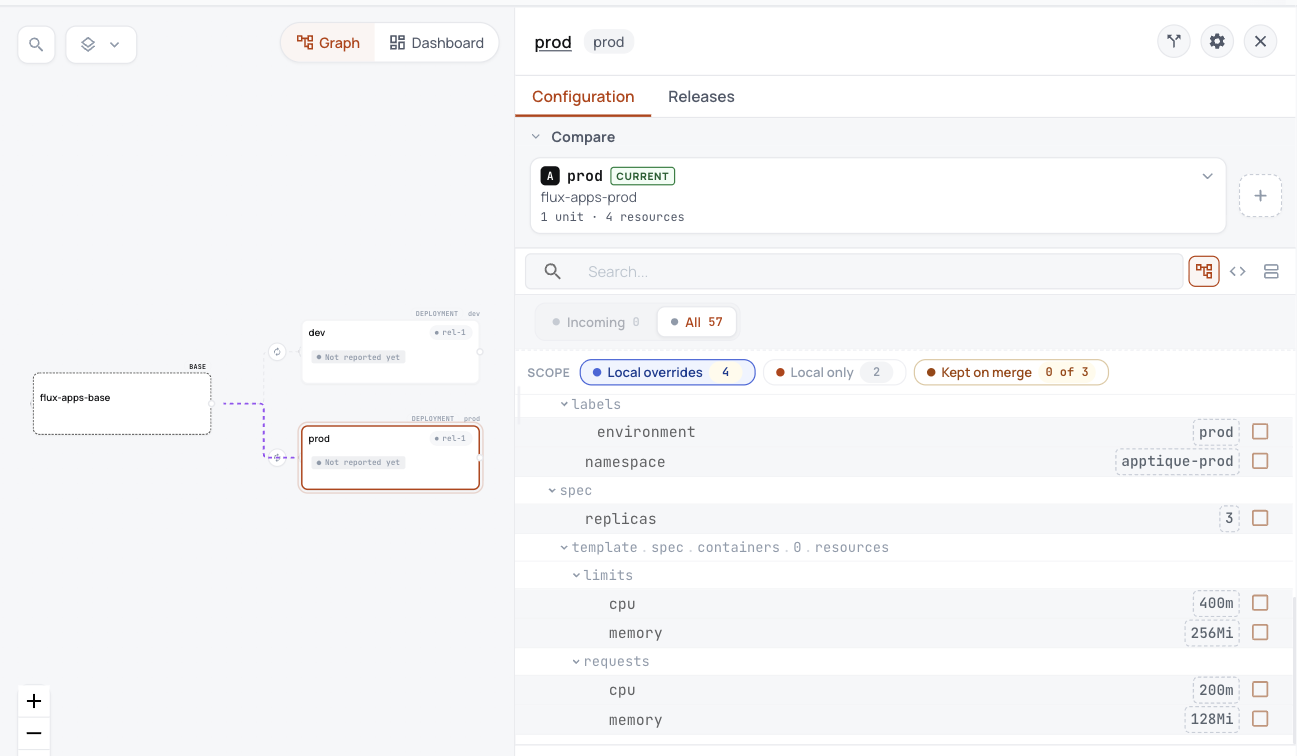
                  adds namespace.yaml
                  namespace apptique-prod
                  label environment=prod
                  Deployment/frontend replace /spec/replicas = 3
                  Deployment/frontend replace /spec/template/spec/containers/0/resources/requests/cpu = 200m
                  Deployment/frontend replace /spec/template/spec/containers/0/resources/requests/memory = 128Mi
                  Deployment/frontend replace /spec/template/spec/containers/0/resources/limits/cpu = 400m
                  Deployment/frontend replace /spec/template/spec/containers/0/resources/limits/memory = 256Mi
                  Flux spec.healthChecks[0].namespace = apptique-prod
                  Flux spec.targetNamespace = apptique-prod

Sources
  - GitRepository apptique-examples  https://github.com/confighub/examples  (gitops/flux/beginner/infrastructure/base/sources/apptique-examples.yaml)
      branch: dev main, prod main

Bootstrap (stays outside ConfigHub)
  - gitops/flux/beginner/clusters/dev/flux-system
  - gitops/flux/beginner/clusters/prod/flux-system

Handover (apply will write it as handover.sh; plan runs nothing)
  1. keep each layer's Flux Kustomization under its own name and switch its sourceRef to an OCIRepository on the ConfigHub gateway, so Flux keeps its inventory and nothing is reinstalled
  2. first prove each variant renders exactly what Git renders today: infrastructure, apps prune, so anything the release lacks is deleted
  3. leave flux-system alone: flux bootstrap owns it, like the Sveltos management record

Next
  cub flux apply . --require Healthy --out ./flux-onboarding
  That writes apply.sh, handover.sh and cleanup.sh. It runs nothing.
3. See what changes in each Kustomization
After the handover each layer's Kustomization keeps its name, so Flux keeps its inventory and reinstalls nothing. These are the only fields that change.
| Cluster and layer | Field | Before | After |
|---|---|---|---|
| dev apps | spec.path | ./gitops/flux/beginner/apps/dev | ./ |
| dev apps | spec.sourceRef.kind | GitRepository | OCIRepository |
| dev apps | spec.sourceRef.name | apptique-examples | apps |
| dev infrastructure | spec.path | ./gitops/flux/beginner/infrastructure/dev | ./ |
| dev infrastructure | spec.sourceRef.kind | GitRepository | OCIRepository |
| dev infrastructure | spec.sourceRef.name | apptique-examples | infrastructure |
| prod apps | spec.path | ./gitops/flux/beginner/apps/prod | ./ |
| prod apps | spec.sourceRef.kind | GitRepository | OCIRepository |
| prod apps | spec.sourceRef.name | apptique-examples | apps |
| prod infrastructure | spec.path | ./gitops/flux/beginner/infrastructure/prod | ./ |
| prod infrastructure | spec.sourceRef.kind | GitRepository | OCIRepository |
| prod infrastructure | spec.sourceRef.name | apptique-examples | infrastructure |
The interval, prune, dependsOn, health checks and target namespace stay as they are. Each layer also gets one new object, the OCIRepository it now reads.
| Cluster and layer | New object | Reads |
|---|---|---|
| dev apps | OCIRepository | oci://__CONFIGHUB_OCI__/space/flux-apps-dev |
| dev infrastructure | OCIRepository | oci://__CONFIGHUB_OCI__/space/flux-infrastructure-dev |
| prod apps | OCIRepository | oci://__CONFIGHUB_OCI__/space/flux-apps-prod |
| prod infrastructure | OCIRepository | oci://__CONFIGHUB_OCI__/space/flux-infrastructure-prod |
__CONFIGHUB_OCI__ stands for the gateway, the OCI address your ConfigHub serves releases from. You give it as CONFIGHUB_OCI when you run apply.sh and handover.sh.
4. Try it yourself, with no account
Install cub and the flux plugin as Bring your Flux fleet into ConfigHub shows, first.
# fetch the example at the commit this page was built from
$ git clone https://github.com/confighub/examples.git && git -C examples checkout 7f1b8f2fc849bb6488bc2c58f1469172018fc9dd

$ cd examples/gitops/flux/beginner

# read the plan; it runs nothing
$ cub flux plan . --require Healthy

# write what Flux would run after the handover, and the scripts, to onboard/
$ cub flux apply . --require Healthy --out onboard
Compare clusters/dev/apps.yaml with onboard/layers/dev/apps.yaml to see the table above for yourself.
See it live in ConfigHub
Everything above runs on your own machine with no account. To see the same example in ConfigHub, load it into your own organization with the commands below.
With your own account
# sign in to your organization
$ cub auth login

# fill ConfigHub with the bases and variants the plan names; it changes no cluster
$ CONFIGHUB_OCI=<gateway> bash onboard/apply.sh
onboard/cleanup.sh takes everything back out. The handover, which moves Flux onto ConfigHub releases one cluster at a time, is a separate step in the Flux Guide.
What it looks like in ConfigHub
5. Technical notes and disclaimers
- The plan ran on 2026-10-26 with cub v0.9.0 and flux plugin 0.4.1, inside a checkout of the example. The recorded files and their receipt hold every input and output.
- Both layers prune, so anything a release lacks would be deleted. The plan says to prove first that each variant renders exactly what Git renders today.
- The
flux-systembootstrap stays outside ConfigHub, becauseflux bootstrapowns it.