Before and after
apiVersion: argoproj.io/v1alpha1
kind: Application
metadata:
  name: apptique-prod
  namespace: argocd
  labels:
    app.kubernetes.io/name: apptique
    app.kubernetes.io/instance: apptique-prod
    environment: prod
  finalizers:
    - resources-finalizer.argocd.argoproj.io
spec:
  project: default
  source:
    repoURL: https://github.com/confighub/examples.git
    targetRevision: main
    path: gitops/argo/beginner-app-of-apps/manifests/apptique/prod
  destination:
    server: https://kubernetes.default.svc
    namespace: apptique-prod
  syncPolicy:
    automated:
      prune: true
      selfHeal: true
    syncOptions:
      - CreateNamespace=true
apps/apptique-prod.yaml. You read files like this to work out what each environment runs.
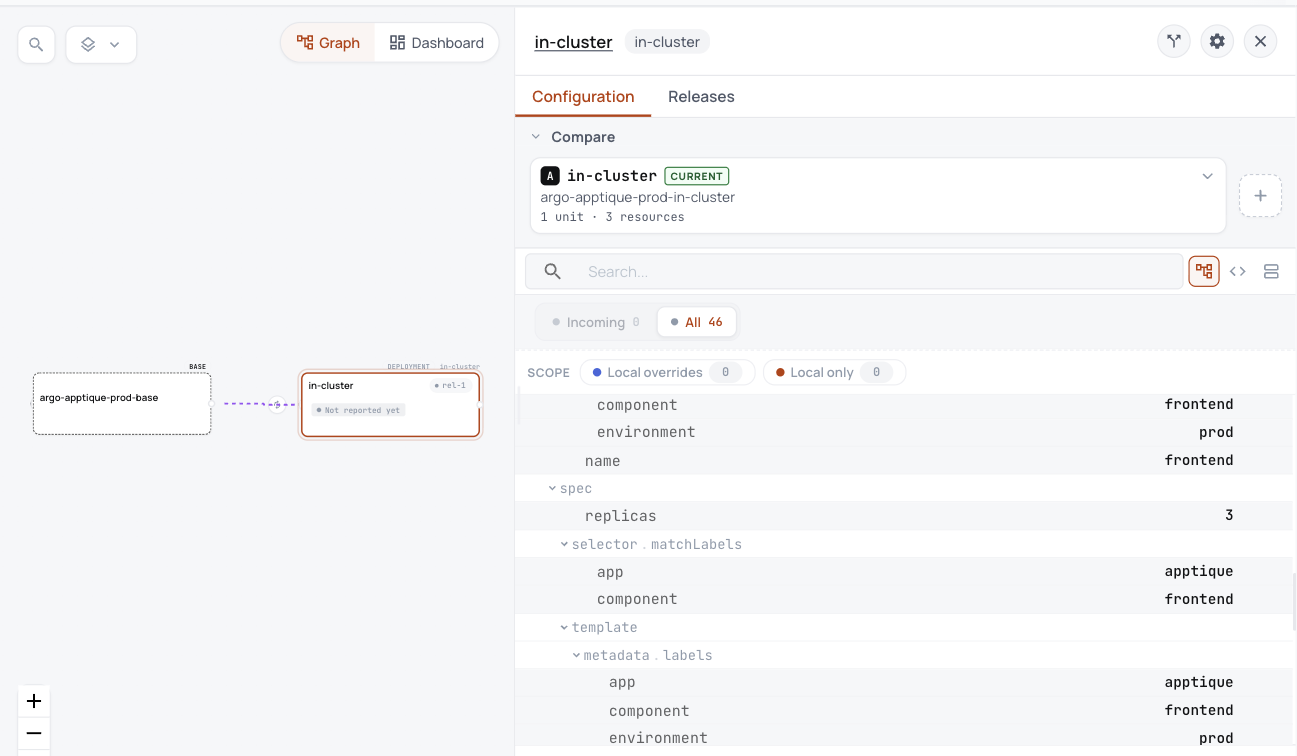
Taken in the helm-catalog organization on 2026-10-25, showing the apptique-prod base with its in-cluster variant, and the prod Deployment's settings.
Each variant is one Unit in ConfigHub, holding everything its Application deploys.
- Each app becomes a base and a variant for the cluster it runs on, released and ready.
- You can read what prod runs in ConfigHub, here 3 replicas of the frontend.
- Argo CD keeps syncing Git until you choose to hand over.
What you work out today, and what happens here instead
| Today | Here instead |
|---|---|
| A root Application makes other Applications, and each one points at a folder in Git. | The root and its Applications stay with Argo CD as the control tree. What each Application deploys is a base in ConfigHub, with a variant for its cluster. |
| Argo CD syncs whatever is in Git. | Argo CD keeps syncing Git until you run handover.sh, which points each Application at ConfigHub's releases. |
ConfigHub keeps configuration as plain objects, with a history of every change. A base holds what every environment shares, and a variant is one environment's copy that stays linked to its base and lists what it changes.
Show me the details (for experienced users)