Skip to content
Browse the site

Deep Dives

AI: Claude and Codex patterns

ConfigHub: Deploy and manage

Configs
Stacks
Apps
Plugins
Guides
Docs

Before and after

cert-manager, before and after

A Helm chart you can't read becomes objects you can.

Before and after

Before: the Helm chart
        {{ with .Values.volumes }}
        {{- toYaml . | nindent 8 }}
        {{- end }}
      {{- end }}
      containers:
        - name: {{ .Chart.Name }}-controller
          image: "{{ template "cert-manager.image" (tuple .Values.image .Values.imageRegistry .Values.imageNamespace (printf ":%s" .Chart.AppVersion)) }}"
          imagePullPolicy: {{ .Values.image.pullPolicy }}
          args:
          {{- /* The if statement below is equivalent to {{- if $value }} but will also return true for 0. */ -}}
          {{- if not (has (quote .Values.global.logLevel) (list "" (quote ""))) }}
          - --v={{ .Values.global.logLevel }}
          {{- end }}
          {{- if .Values.config }}
          - --config=/var/cert-manager/config/config.yaml
          {{- end }}

16 lines of templates/deployment.yaml, around its image line. The chart has many files like this.
After: in ConfigHub
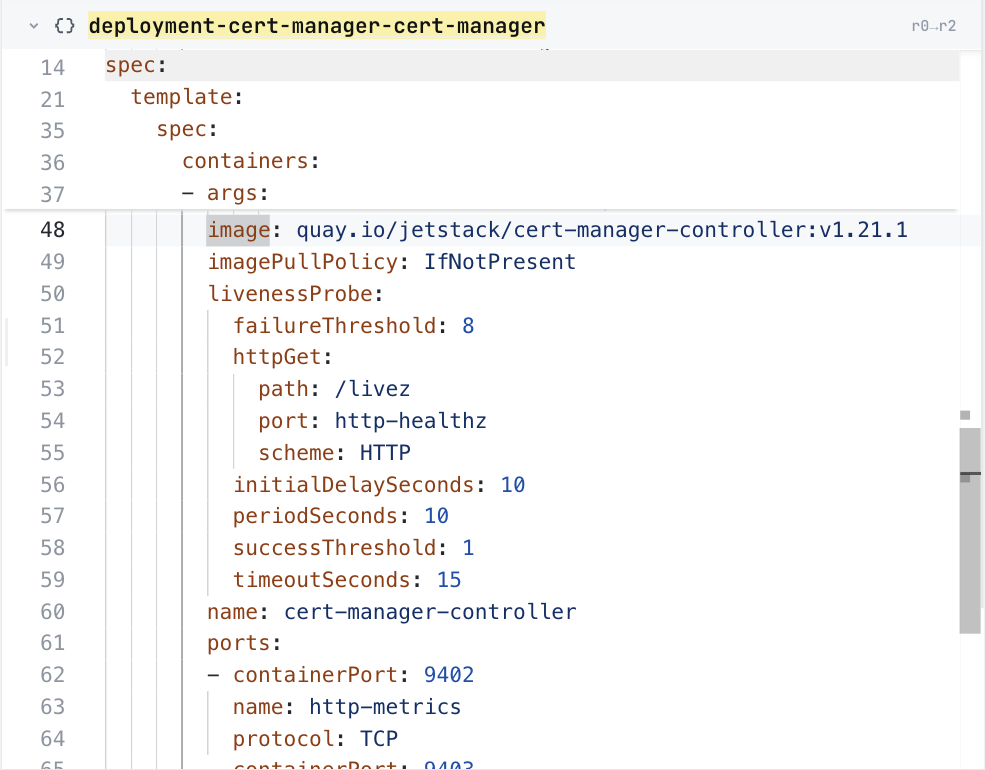
ConfigHub showing the cert-manager controller Deployment, at its image line

The same image line in ConfigHub, as a plain value. Taken in the helm-catalog organization on 2026-10-25, showing the cert-manager controller Deployment, at its image line.

ConfigHub holds this as 48 Units, one for each of the 47 objects the installer writes and one installer record.
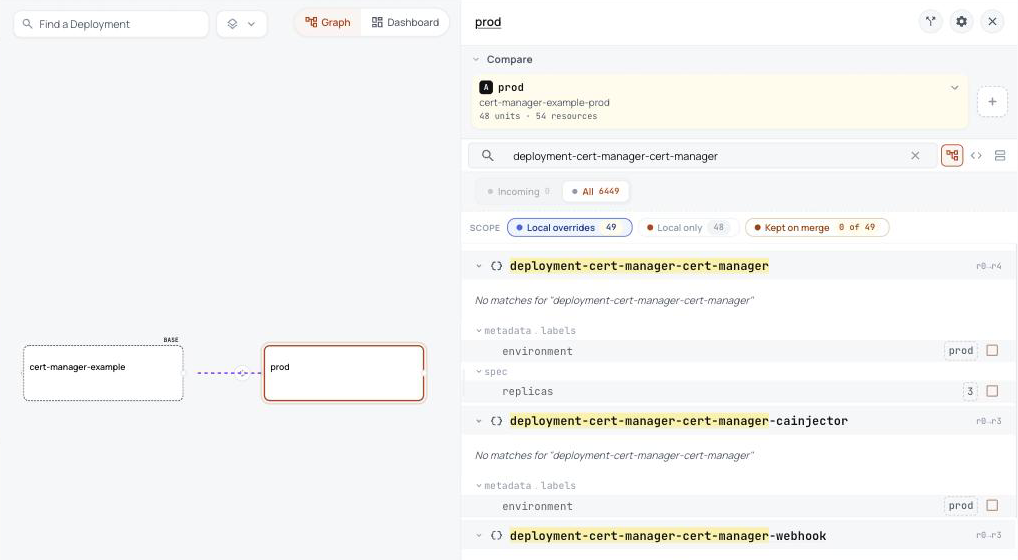
In ConfigHub: one base, and a variant for each environment
ConfigHub showing the cert-manager base with a prod variant, and the label and three replicas prod sets on the controller

Prod's panel lists what prod changes from the base, here its label and three replicas of the controller. Taken in the helm-catalog organization on 2026-10-26, showing the cert-manager base with a prod variant, and the label and three replicas prod sets on the controller.

  • The template's image line becomes one plain value you can read, and so does every other field.
  • The 4 setup objects Helm runs out of sight are left out, so nothing runs that you didn't see.
  • Every object is written out, so you can review it before anything runs.

What Helm does that you never see, and what happens here instead

What Helm doesWhat happens here instead
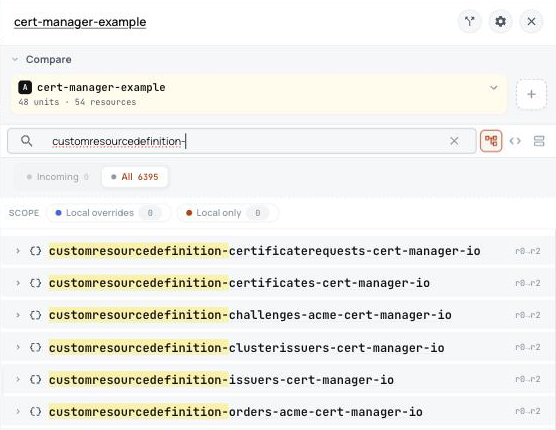
Adds 6 new kinds of Kubernetes object, such as Certificate, Issuer, ClusterIssuer.They are in ConfigHub with everything else, and they go in first, so the objects that use them are not rejected. They are also marked to stay if the rest is deleted, because deleting a CRD deletes every object of that kind.
Show meConfigHub showing the 6 cert-manager CRDs as Units in the base

The 6 new kinds

  • Challenge
  • Order
  • CertificateRequest
  • Certificate
  • ClusterIssuer
  • Issuer
Runs a Job after installing that waits until the cert-manager API answers.It is left out, and nothing runs it. It only checks, and makes nothing the rest needs.
Show me

What Helm runs, and when

  • ServiceAccount cert-manager-startupapicheck: after installing
  • Role cert-manager-startupapicheck:create-cert: after installing
  • RoleBinding cert-manager-startupapicheck:create-cert: after installing
  • Job cert-manager-startupapicheck: after installing

ConfigHub keeps configuration as plain objects, with a history of every change. Loading puts this chart's objects in a Space, a folder in your ConfigHub organization.

Load it into your ConfigHub

Sign in with the first line, then paste the rest. It fetches the cert-manager package, writes its files, and saves them as a Space called cert-manager-example in your organization. The rest makes a prod variant of it, and prod runs three replicas of the controller. It touches no cluster.

$ cub auth login

$ cub installer setup --pull oci://europe-west1-docker.pkg.dev/nth-fort-499605-q5/helm-expt/jetstack-cert-manager:v1.21.1@sha256:830d0dfee2531c05cb48f3328abd1858b97bacf050208e583ab2dd2214d2cba5 --base crds-enabled --work-dir ./cert-manager-example --non-interactive --namespace cert-manager && cub installer upload --work-dir ./cert-manager-example --space cert-manager-example && cub component create cert-manager-example && cub space update --patch cert-manager-example --component cert-manager-example

$ cub variant create prod cert-manager-example --change-desc "Clone the base as prod"

$ cub function set --space cert-manager-example-prod --change-desc "Label every object environment prod" set-label environment prod

$ cub function set --space cert-manager-example-prod --unit deployment-cert-manager-cert-manager --change-desc "Run three replicas in prod" set-replicas 3

You need a ConfigHub account and cub with its installer plugin and kustomize.

Try it on your laptop

No account needed. This fetches the cert-manager package and writes every object into a folder you can open. To check your own chart and values instead, see Is my configuration right?

$ cub installer setup --pull oci://europe-west1-docker.pkg.dev/nth-fort-499605-q5/helm-expt/jetstack-cert-manager:v1.21.1@sha256:830d0dfee2531c05cb48f3328abd1858b97bacf050208e583ab2dd2214d2cba5 --base crds-enabled --work-dir ./cert-manager-example --non-interactive --namespace cert-manager && ls ./cert-manager-example/out/manifests

You need cub with its installer plugin and kustomize.

Show me the details (for experienced users)