Before and after
apiVersion: kustomize.config.k8s.io/v1beta1
kind: Kustomization

namespace: apptique-prod

resources:
  - ../base/apptique
  - namespace.yaml

labels:
  - pairs:
      environment: prod

images:
  - name: nginx
    newTag: 1.26.3-alpine

patches:
  - target:
      kind: Deployment
      name: frontend
    patch: |
      - op: replace
        path: /spec/replicas
        value: 4
apps/prod/kustomization.yaml. You read files like this to work out what each environment runs.
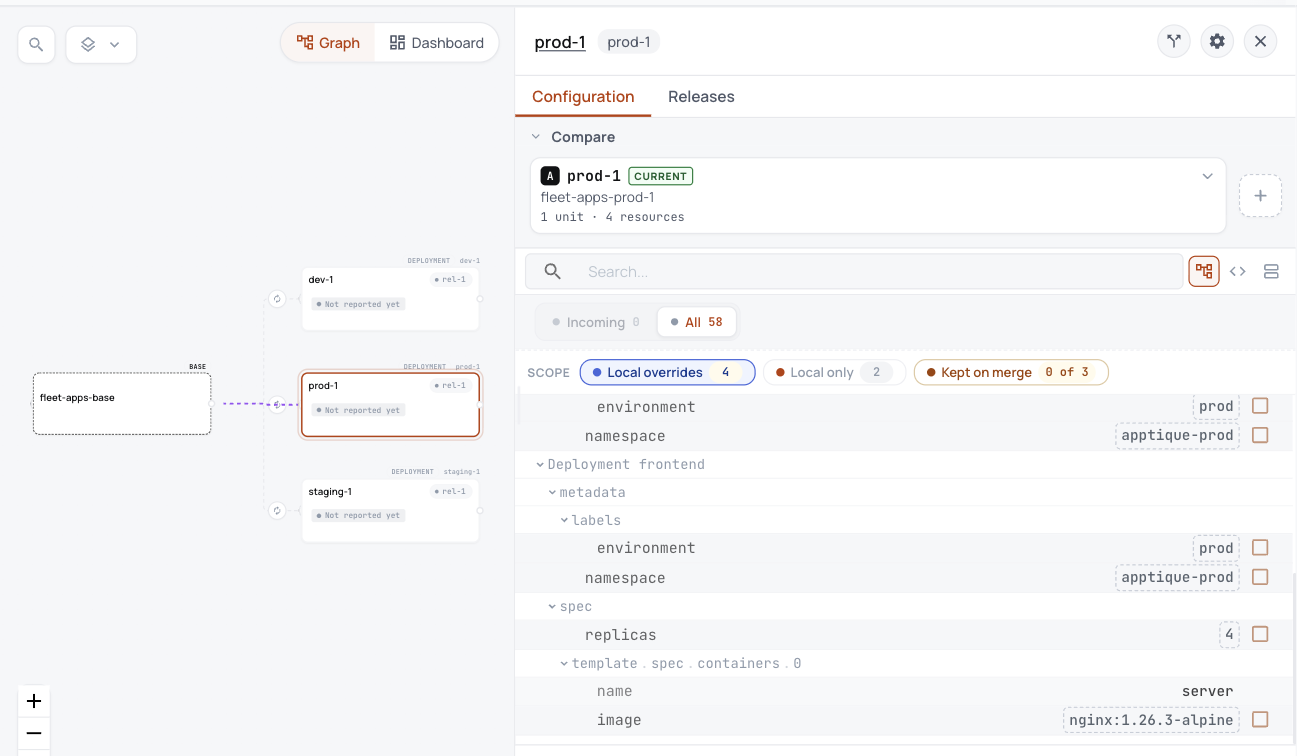
Taken in the helm-catalog organization on 2026-10-25, showing the apps layer's base with a variant for each cluster, and the settings prod-1 changes.
Each variant is one Unit in ConfigHub, holding everything its layer applies on that cluster.
| Cluster | nginx version |
|---|---|
| dev-1 | 1.27.3-alpine |
| staging-1 | 1.27.2-alpine |
| prod-1 | 1.26.3-alpine |
This is what the repository says each cluster should run. Nothing here reads a live cluster.
- Each layer is one base, with a variant for each cluster that runs it.
- Prod-1's changes are listed in one place, here nginx 1.26.3 and 4 replicas.
- Dev, staging and prod are stages in that order, so a version moves from one to the next.
What you work out today, and what happens here instead
| Today | Here instead |
|---|---|
| Image automation writes new tags into the dev overlay. | It keeps doing so, and the plan names it, so you know dev's version can change without a review. |
| A HelmRelease pins edge-router to 2.4.x, so its version can change at any reconcile. | The plan says to pin one exact version, so what runs changes only when a release says so. |
ConfigHub keeps configuration as plain objects, with a history of every change. A base holds what every environment shares, and a variant is one environment's copy that stays linked to its base and lists what it changes.
Show me the details (for experienced users)