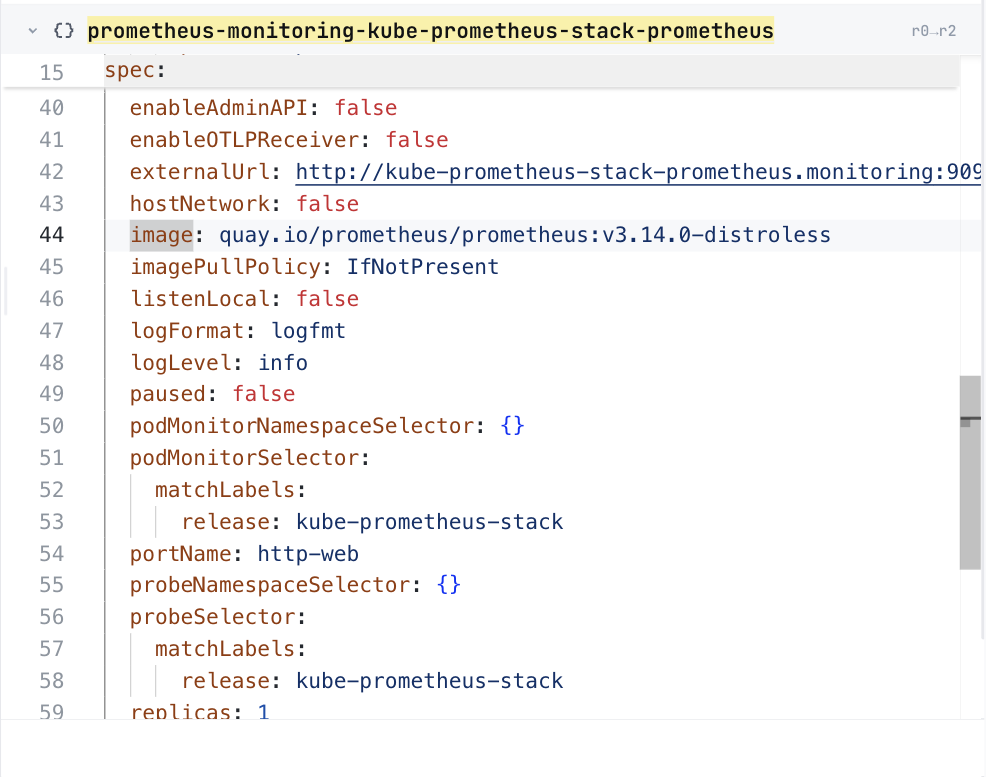
16 lines of templates/prometheus/prometheus.yaml, around its image line. The chart has many files like this.
After: in ConfigHub
The same image line in ConfigHub, as a plain value. Taken in the helm-catalog organization on 2026-10-25, showing the Prometheus object, at its image line.
ConfigHub holds this as 125 Units, one for each of the 124 objects the installer writes and one installer record.
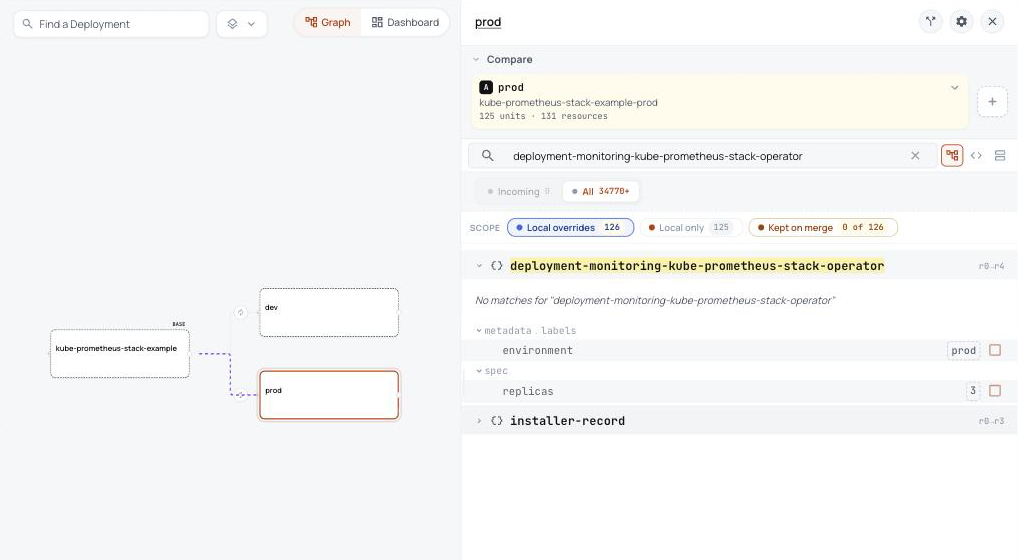
In ConfigHub: one base, and a variant for each environment
Prod's panel lists what prod changes from the base, here its label and three replicas of the operator. Taken in the helm-catalog organization on 2026-10-26, showing the kube-prometheus-stack base with its dev and prod variants, and the label and three replicas prod sets on the operator.
The template's image line becomes one plain value you can read, and so does every other field.
The 7 setup objects Helm runs out of sight become steps you can read.
Every object is written out, so you can review it before anything runs.
What Helm does that you never see, and what happens here instead
What Helm does
What happens here instead
Adds 10 new kinds of Kubernetes object, such as Prometheus, ServiceMonitor, PrometheusRule. A plain helm template leaves them out.
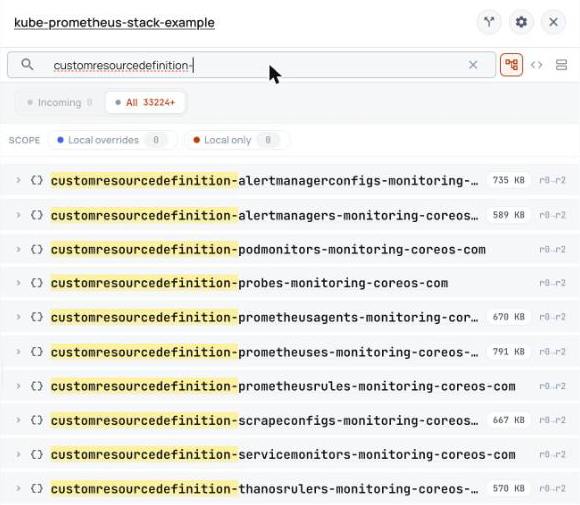
They are in ConfigHub with everything else, and they go in first, so the objects that use them are not rejected.Show me
The 10 new kinds
AlertmanagerConfig
Alertmanager
PodMonitor
Probe
PrometheusAgent
Prometheus
PrometheusRule
ScrapeConfig
ServiceMonitor
ThanosRuler
Runs two short-lived Jobs while installing. The first makes a TLS certificate for the admission webhook, and the second hands that certificate to the webhook.
Nothing runs out of sight. The plan says to run the same two Jobs, in that order, and then remove them.Show me
What Helm runs, and when
ServiceAccount kube-prometheus-stack-admission: before installing, before upgrading, after installing, after upgrading
ClusterRole kube-prometheus-stack-admission: before installing, before upgrading, after installing, after upgrading
ClusterRoleBinding kube-prometheus-stack-admission: before installing, before upgrading, after installing, after upgrading
Role kube-prometheus-stack-admission: before installing, before upgrading, after installing, after upgrading
RoleBinding kube-prometheus-stack-admission: before installing, before upgrading, after installing, after upgrading
Job kube-prometheus-stack-admission-create: before installing, before upgrading
Job kube-prometheus-stack-admission-patch: after installing, after upgrading
Decides at install time when each of its hidden steps runs, in an order you cannot see.
The plan writes down 8 steps, in order, for whoever delivers.Show me
The plan's steps
The package applies the locked CRDs before the chart objects that use them.
The run removes both completed Jobs and their temporary RBAC objects.
The package runs the chart's webhook patch Job after the webhook objects exist.
The package runs the chart's certificate creation Job before applying the admission webhooks.
The direct package route upgraded the default preset from 85.3.3 to 86.1.0, established the updated CRDs, retained the admission Secret, reran the webhook step, checked six workloads, and removed the temporary Jobs.
The direct runner applies CRDs, creates the certificate, applies the workload, and patches the webhooks in that order.
The certificate Job creates the required admission Secret with ca, cert, and key.
The run checks three CA bundles, the operator endpoint, a server dry-run, and six workloads.
ConfigHub keeps configuration as plain objects, with a history of every change. Loading puts this chart's objects in a Space, a folder in your ConfigHub organization.
Load it into your ConfigHub
Sign in with the first line, then paste the rest. It fetches the kube-prometheus-stack package, writes its files, and saves them as a Space called kube-prometheus-stack-example in your organization. The rest makes a dev and a prod variant of it, and prod runs three replicas of the operator. It touches no cluster.
$ cub auth login

$ cub installer setup --pull oci://europe-west1-docker.pkg.dev/nth-fort-499605-q5/helm-expt/prometheus-community-kube-prometheus-stack:88.6.3@sha256:ee4622c4d2a34dbe1a85a6fbaa56cc47a9440dcdf88047b5776dd6689bfff44a --base default --work-dir ./kube-prometheus-stack-example --non-interactive --namespace monitoring && cub installer upload --work-dir ./kube-prometheus-stack-example --space kube-prometheus-stack-example && cub component create kube-prometheus-stack-example && cub space update --patch kube-prometheus-stack-example --component kube-prometheus-stack-example

$ cub variant create dev kube-prometheus-stack-example --change-desc "Clone the base as dev"

$ cub variant create prod kube-prometheus-stack-example --change-desc "Clone the base as prod"

$ cub function set --space kube-prometheus-stack-example-dev --change-desc "Label every object environment dev" set-label environment dev

$ cub function set --space kube-prometheus-stack-example-prod --change-desc "Label every object environment prod" set-label environment prod

$ cub function set --space kube-prometheus-stack-example-prod --unit deployment-monitoring-kube-prometheus-stack-operator --change-desc "Run three replicas in prod" set-replicas 3
No account needed. This fetches the kube-prometheus-stack package and writes every object into a folder you can open. To check your own chart and values instead, see Is my configuration right?