A base and two overlays become one base with dev and prod variants, and prod's changes are listed in one place.
Before and after
Before: the prod overlay
apiVersion: kustomize.config.k8s.io/v1beta1
kind: Kustomization

namespace: apptique-prod

resources:
  - ../base
  - namespace.yaml

labels:
  - pairs:
      environment: prod

# A second, separate pull request writes here: promotion, not CI. It copies
# the tag dev is running (or an earlier one someone chose to skip to) into
# this line. See PROMOTED_FROM.md for what was actually promoted and when.
images:
  - name: ghcr.io/confighub/apptique-frontend
    newTag: v1.3.0

patches:
  - target:
      kind: Deployment
      name: frontend
    patch: |
      - op: replace
prod/kustomization.yaml, its first 26 of 40 lines. You read files like this to work out what each environment runs.
After: in ConfigHub
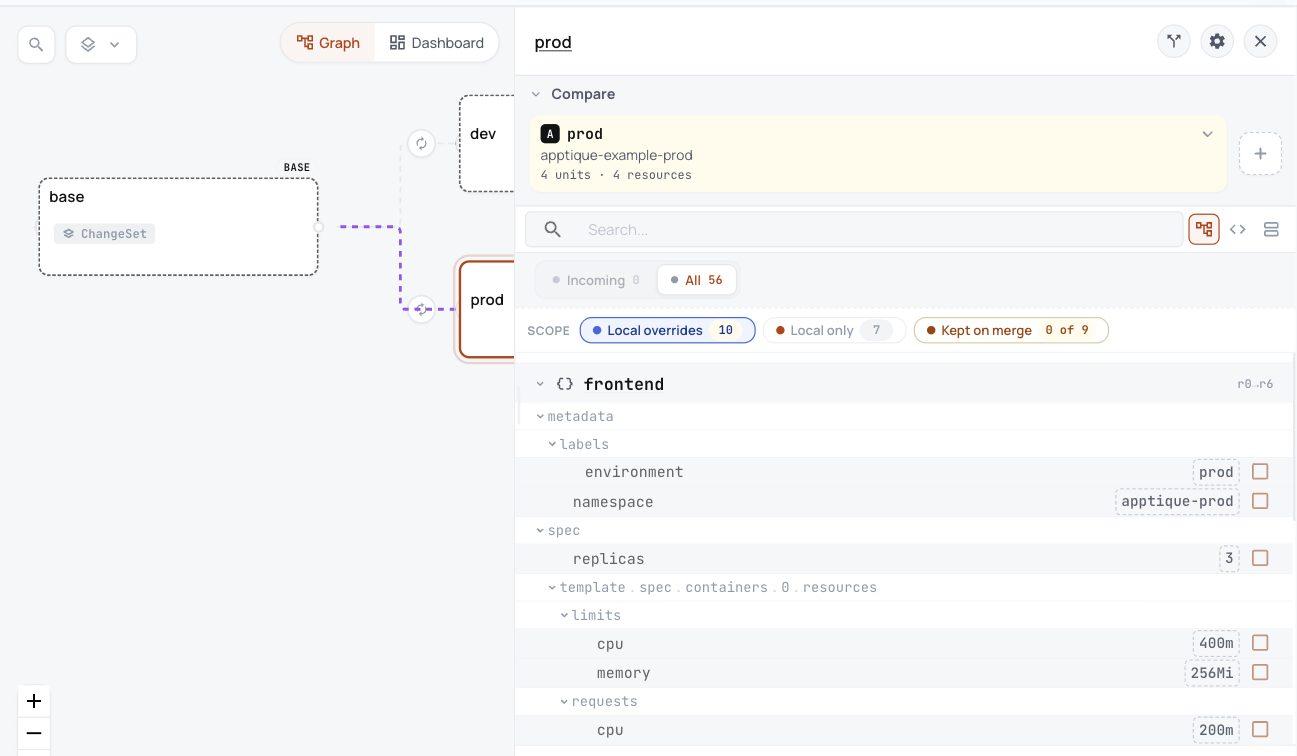
Taken in the helm-catalog organization on 2026-10-25, showing the base with its dev and prod variants, and the settings prod changes.
Each variant holds 4 Units in ConfigHub, one per object.
Prod's changes from the base are listed in one place: namespace, label, 3 replicas and its resources.
Dev and prod stay linked to one base, so a change to the base can reach both.
Every object is written out, with nothing left to work out from patches.
What you work out today, and what happens here instead
Today
Here instead
Prod is the base plus an overlay of patches, labels and a namespace, so you work out prod's objects in your head.
Each variant holds its finished objects, and prod's panel lists only what prod changes.
Nothing else. There are no CRDs and no Helm hooks.
Nothing else to move.
ConfigHub keeps configuration as plain objects, with a history of every change. A base holds what every environment shares, and a variant is one environment's copy that stays linked to its base and lists what it changes.
Load it into your ConfigHub
Sign in, then paste the rest. It fetches the example, works out what each environment runs, and saves it in your organization. It touches no cluster.
$ cub auth login

$ git clone https://github.com/confighub/examples.git && git -C examples checkout 7f1b8f2fc849bb6488bc2c58f1469172018fc9dd

$ cd examples/gitops/argo/intermediate-ci-to-gitops/gitops-repo/environments/apptique

$ kustomize build base > base.yaml

$ cub variant upload --component apptique-example --variant base --namespace apptique --create-namespace --change-desc "Seed the base from the repository base directory" base.yaml

$ cub function set --space apptique-example-base --unit frontend --change-desc "Run image tag v1.3.0" set-container-image-reference server :v1.3.0

$ cub variant create dev apptique-example-base --namespace apptique-dev --change-desc "Clone the base as dev"

$ cub variant create prod apptique-example-base --namespace apptique-prod --change-desc "Clone the base as prod"

$ cub function set --space apptique-example-dev --change-desc "Label every object environment dev" set-label environment dev

$ cub function set --space apptique-example-prod --change-desc "Label every object environment prod" set-label environment prod

$ cub function set --space apptique-example-prod --unit frontend --change-desc "Run three replicas in prod" set-replicas 3

$ cub function set --space apptique-example-prod --unit frontend --change-desc "Give prod the requests and limits of the prod overlay" set-container-resources server all 200m 128Mi 2