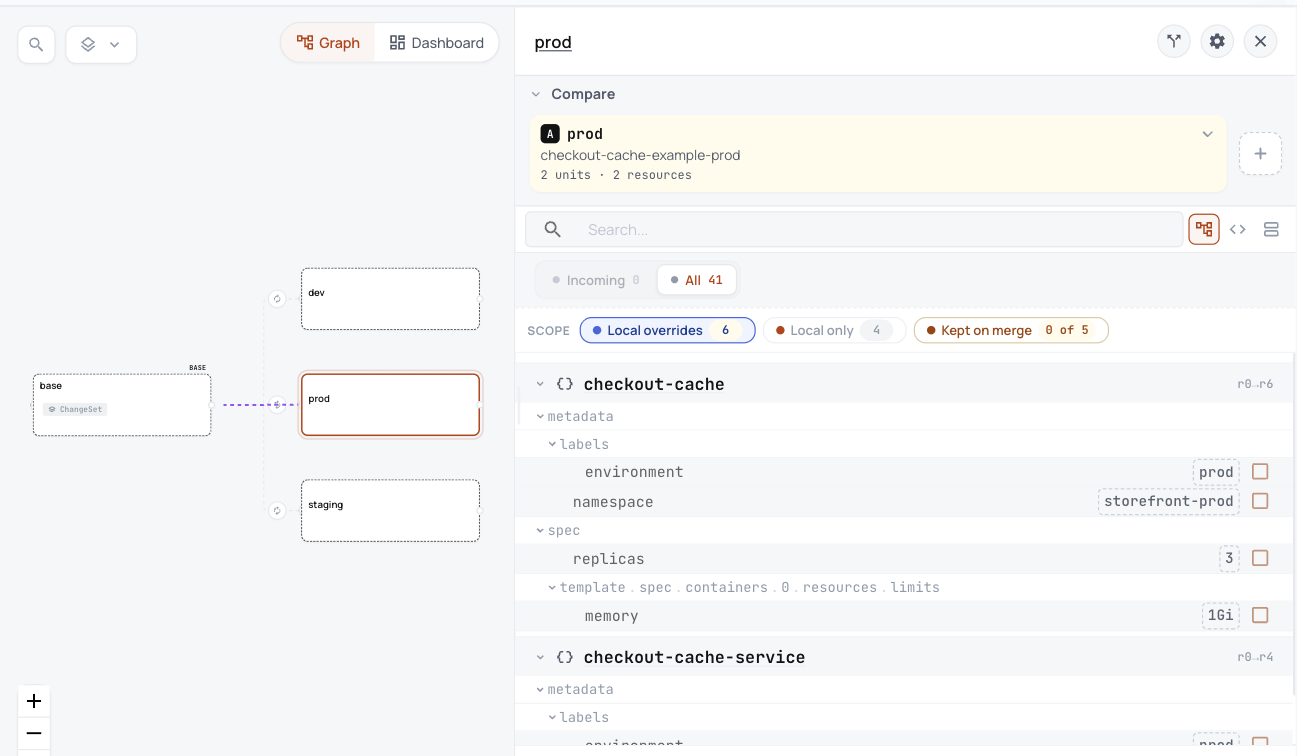
A Helm chart inflated by Kustomize becomes one base with a variant per environment, and prod's changes are listed in one place.
Before and after
Before: Kustomize inflating a chart
apiVersion: kustomize.config.k8s.io/v1beta1
kind: Kustomization

# The wrinkle an expert will recognise: this app is a Helm chart wrapped in
# Kustomize. Argo CD sees a Kustomize application, Kustomize inflates the
# chart, and the overlays patch the rendered output. The chart itself lives
# in this repo under charts/checkout-cache, so nothing has to be pulled from
# a chart registry to render it, and Kustomize finds it in the default
# chart home, the charts/ folder next to this kustomization.
helmCharts:
  - name: checkout-cache
    releaseName: checkout-cache
    version: 0.3.1
    valuesInline:
      replicaCount: 1
      maxmemory: 128mb

labels:
  - pairs:
      app.kubernetes.io/part-of: storefront
base/kustomization.yaml. You read files like this to work out what each environment runs.
After: in ConfigHub
Taken in the helm-catalog organization on 2026-10-25, showing the base with its dev, staging and prod variants, and the settings prod changes.
Each variant holds 2 Units in ConfigHub, one per object.
Prod's changes from the base are listed in one place: namespace, label, 3 replicas and a 1Gi memory limit.
Each object lands in the namespace you can see, not the one Argo CD happens to use.
No one has to run Helm inside Kustomize to know what an environment runs.
What you work out today, and what happens here instead
Today
Here instead
Kustomize runs Helm every time it builds, so you cannot see what the chart makes without building it.
Helm runs once, and what it renders becomes the base, with a variant for each environment.
Nothing else. The chart has no CRDs and no Helm hooks.
Nothing else to move.
ConfigHub keeps configuration as plain objects, with a history of every change. A base holds what every environment shares, and a variant is one environment's copy that stays linked to its base and lists what it changes.
Load it into your ConfigHub
Sign in, then paste the rest. It fetches the example, works out what each environment runs, and saves it in your organization. It touches no cluster.
$ cub auth login

$ git clone https://github.com/confighub/examples.git && git -C examples checkout 7f1b8f2fc849bb6488bc2c58f1469172018fc9dd

$ cd examples/gitops/argo/expert-app-of-apps/apps/checkout-cache

$ kustomize build --enable-helm base > base.yaml

$ cub variant upload --component checkout-cache-example --variant base --namespace storefront --change-desc "Seed the base from the chart Kustomize inflates" base.yaml

$ for env in dev staging prod; do cub variant create $env checkout-cache-example-base --namespace storefront-$env --change-desc "Clone the base as $env"; done

$ for env in dev staging prod; do cub function set --space checkout-cache-example-$env --change-desc "Label every object environment $env" set-label environment $env; done

$ cub function set --space checkout-cache-example-staging --unit checkout-cache --change-desc "Run two replicas in staging" set-replicas 2

$ cub function set --space checkout-cache-example-prod --unit checkout-cache --change-desc "Run three replicas in prod" set-replicas 3

$ cub function set --space checkout-cache-example-prod --unit checkout-cache --change-desc "Give prod a 1Gi memory limit" -- set-yq '.spec.template.spec.containers[0].resources.limits.memory = "1Gi"'