Before and after
apiVersion: kustomize.toolkit.fluxcd.io/v1
kind: Kustomization
metadata:
  name: apps
  namespace: flux-system
spec:
  dependsOn:
    - name: infrastructure
  interval: 5m
  path: ./gitops/flux/beginner/apps/prod
  prune: true
  sourceRef:
    kind: GitRepository
    name: apptique-examples
  targetNamespace: apptique-prod
  healthChecks:
    - apiVersion: apps/v1
      kind: Deployment
      name: frontend
      namespace: apptique-prod
clusters/prod/apps.yaml. You read files like this to work out what each environment runs.
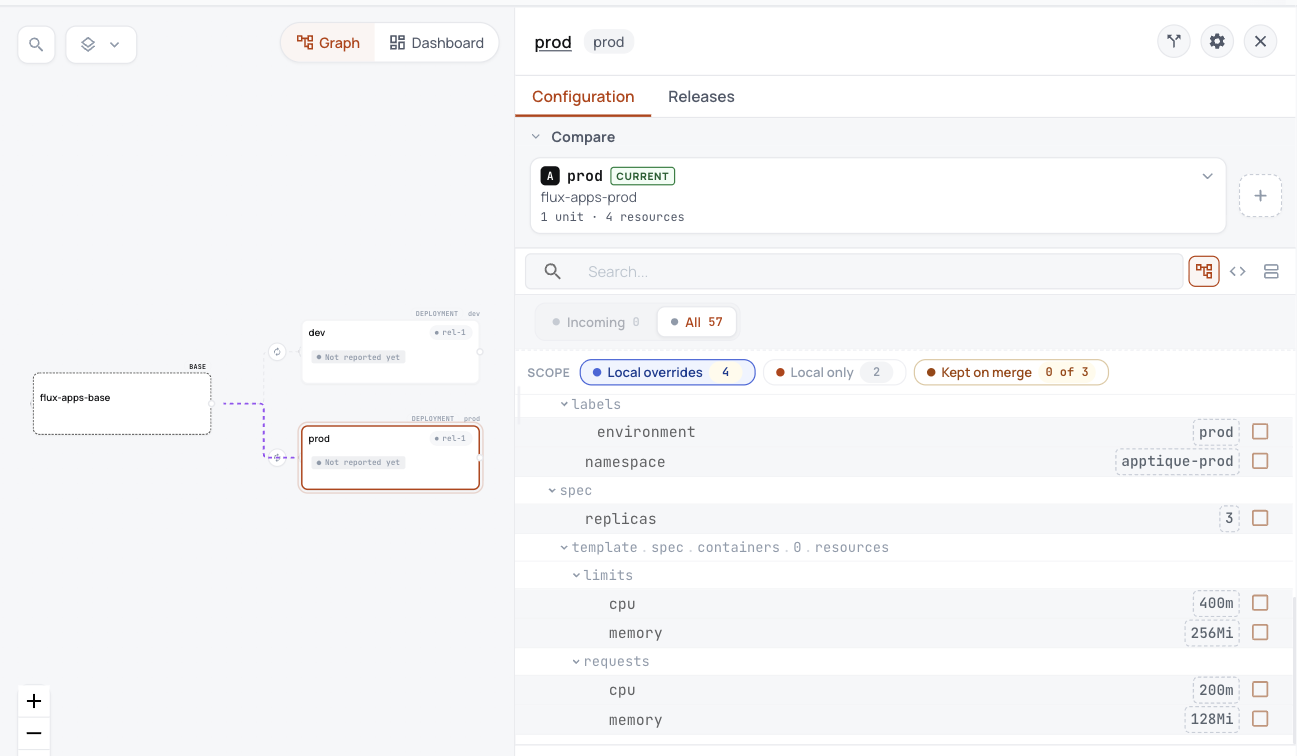
Taken in the helm-catalog organization on 2026-10-25, showing the apps layer's base with its dev and prod variants, and the settings prod changes.
Each variant is one Unit in ConfigHub, holding everything its layer applies on that cluster.
- Each layer becomes a base and a variant for each cluster.
- Prod's changes from the base are listed in one place: namespace, label, 3 replicas and its resources.
- Flux keeps reconciling Git until you choose to hand over.
What you work out today, and what happens here instead
| Today | Here instead |
|---|---|
| Each cluster's Kustomization points at an overlay in Git, and Flux applies it. | Each layer is a base in ConfigHub with a variant for each cluster. The Kustomization stays in Flux, and after handover it reads ConfigHub instead of Git. |
| flux bootstrap owns flux-system. | It stays outside ConfigHub, and the plan lists it. |
ConfigHub keeps configuration as plain objects, with a history of every change. A base holds what every environment shares, and a variant is one environment's copy that stays linked to its base and lists what it changes.
Show me the details (for experienced users)